
Farm Sim UK Logo
Home Mods Knowledge Base About Register
Home Mods Directory Adjust Tramlines For Missions

Adjust Tramlines For Missions

PC Only
Created by: BayernGamers
Report this mod
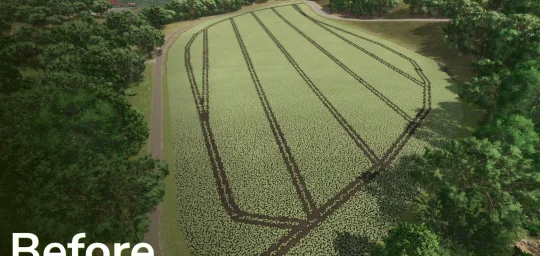
This mod allows you to adjust the tramlines on mission fields to match your own machines or working widths of rented mission vehicles.

When accepting a field mission (fertilizing, spraying, hoeing, weeding) in the mission menu, an additional window appears for supported crop types that allows you to adjust the tramlines.
It is also possible to adjust the tramlines for missions that have already been accepted but not yet started (progress at 0%). This adjustment can be made in the active missions menu.

When purchasing a field, it is also possible to make a one-time adjustment of the tramlines to match your own machines. This change takes effect immediately.
Later adjustments are still possible via the regular Precision Farming menu, but without immediate effect, but according to the usual handling of Precision Farming.

The mod also adds the console command "pfTramlineReset ", which resets the tramlines of a field. The field will then be completely covered with the current crop type again.
In addition, the console command "pfTramlineSet " from PrecisionFarming is unlocked for multiplayer, which can be used to set tramlines on a field.
Screenshot 1
Screenshot 2
Screenshot 3
Screenshot 4
Screenshot 5
Screenshot 6

Screenshot 1

Screenshot 2

Screenshot 3

Screenshot 4

Screenshot 5

Screenshot 6

Screenshot 1
Screenshot 2
Screenshot 3
Screenshot 4
Screenshot 5
Screenshot 6

Screenshot 1

Screenshot 2

Screenshot 3

Screenshot 4

Screenshot 5

Screenshot 6

Mod Information

Game: Farming Simulator 25
Brand: None
Categories:
Gameplay
Contributors:
Added: Feb 10, 2026
Last Updated: Feb 10, 2026
Latest Version: 1.0.0.0
Crossplay: No

Version History

Version 1.0.0.0

Feb 9, 2026

Initial release.

We value your privacy

We use cookies to keep you logged in, remember your preferences, and understand how people use Farm Sim UK through Google Analytics. You can accept all cookies, reject non-essential ones, or choose exactly which types to allow. Read our Cookie Policy and Privacy Policy to learn more.

Cookie preferences

Strictly necessary

Session management, security (CSRF), and your cookie preference. Cannot be disabled.

Always on

Analytics (Google Analytics)

Helps us understand which pages are popular and how visitors navigate the site. No personal data is sold.
